
User Research · Picta Native Apps
UT Native
Apps.
How users discover, understand, and trust the service: from ad to checkout.
3 sessions · Illustrative Posters use case
June 2026
Context
The journey we tested.
From the first ad on social, all the way to placing an order.
1
Ad (fake)
2
Website
3
App Store
4
App
5
Checkout
The ad
The ad we showed.
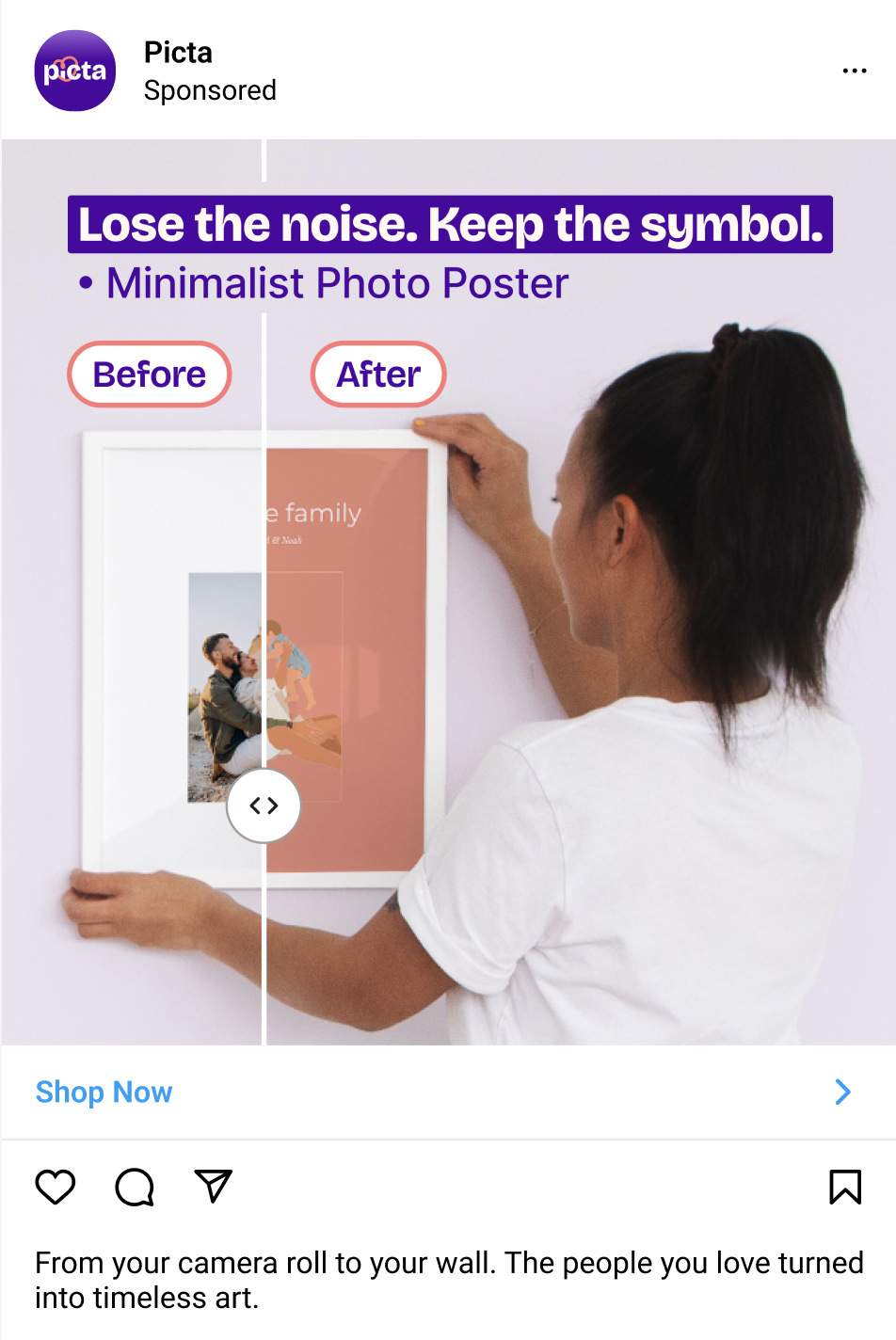
Platform
Instagram-style sponsored post.
Headline
"Lose the noise. Keep the symbol."
Format
Before/after slider on a framed poster mockup.
CTA
Shop Now.
Method
What we did.
3
User testing sessions, US participants
1
Use case: Illustrative Posters
5
Touchpoints: Ad (fake), Website, App Store, App, Checkout
The big picture
Three themes shaped what we heard.
3 insights
01
Comprehension
What users get (and don't get) at each stage of the funnel.
3 insights
02
Trust
What earns belief in an unknown brand, including AI and privacy.
1 insight
03
Usability
Where the flow holds up, and where small frictions show.
Section 01 / 03
01
Comprehension.
Research question What do users understand about the service from the ad, the website, and the app? What expectations do they form?
Comprehension · Insight 01View in Dovetail →
Product comprehension starts on the website, not on the ad.
1
The before/after visual in the ad is consistently misread.
Interpreted as two different photos with different colors, a size difference within a frame, or simply unclear. Not decoded as a photo-to-art transformation.
2
The text on the ad adds confusion rather than clarity.
The slogan is either skipped entirely or misread as unrelated to the service. Rather than compensating for the visual confusion, the ad copy reinforces it.
Also see: users are drawn to clean visuals and videos, not text-heavy ads.
3
The headline "Turn your photo into an art poster," the product video, and the 1-2-3 step section finally make the service understood.
"
I'm a little bit confused on the before and after.
▶
P02 · Ad reaction
click to play highlight
How might we
Make ads self-explanatory enough that users understand the transformation before they tap?
Comprehension · Insight 02View in Dovetail →
Product variety is hidden behind the download.
1
The website frames the service as poster-only.
The product page focuses on the illustrative art poster. Other products live further down, but users scroll past them without engaging.
2
The app and App Store catalog is a positive surprise that opens new use cases.
Coloring books, cards, retro prints. The App Store screenshots are described as a better representation of the service than the ad.
3
The gift use case is the strongest spontaneous reaction to the catalog.
Mother's & Father's Day, Christmas, pets, kids' activities. Gifting surfaces spontaneously across sessions.
"
This lets me know it's not just one type of product, and my kids love coloring.
▶
P01 · App Store
click to play highlight
How might we
Give users a clear entry point to the full product range while they're still on the website?
Comprehension · Insight 03View in Dovetail →
Customization wording sets high expectations for variety.
1
Users expect multiple art style options after seeing "customize" language.
The website and app use terms like "customize" and "create," which set an expectation of creative control.
2
Limited style options reduce purchase intent.
Users who would otherwise purchase describe the single-style limitation as a reason to hesitate. The desire is to see the same photo rendered in multiple styles, then choose.
"
So if you tell me I can customize, I want to customize that shit.
▶
P03 · On style options
click to play highlight
How might we
Expand (or reframe) customization so the experience matches the language?
Section 02 / 03
02
Trust.
Research question What level of trust does each stage inspire, and what signals do users rely on?
Trust · Insight 04View in Dovetail →
Users rely on different trust indicators, and no single one is decisive.
1
Social proof (engagement, reviews, ratings) is the primary trust signal for cautious users.
Engagement on the ad, star ratings on the website, and review volume on the App Store are checked at every stage. A high rating with few reviews is read as "new," not "trusted."
2
Design quality and transparency function as trust signals for others.
A clean layout, clear pricing, visible shipping costs, and consistent visual identity create a sense that the service is "well thought out" and genuine.
3
Brand recognition is not always a prerequisite for clicking or downloading.
Some users regularly click on ads from unknown brands when the ad itself is visually appealing and the product page is relevant.
"
If the ad doesn't have a lot of engagement, I'm skeptical.
▶
P02 · On ad engagement
click to play highlight
How might we
Layer multiple trust signals so different profiles each find something that reassures them?
Trust · Insight 05View in Dovetail →
AI is accepted. Photo privacy is the real concern.
1
The use of AI is overall accepted.
All three sessions show acceptance of AI as the method, even with some skepticism. Some users are fully comfortable; others have quality concerns based on past experience, but none reject the concept. AI-generated custom gifts are also described as a current trend.
2
Photo privacy is a consistent concern regardless of AI attitude.
The question "will my photos be stored, reused, or shared?" surfaces even among AI-positive users. Particularly sensitive for family photos.
3
AI disclosure is expected but not always present.
The use of AI is correctly guessed by all participants, but not explicitly stated. The preference is for upfront disclosure on the ad or homepage.
"
I want reassurance that they're not going to store the photo.
▶
P01 · Photo upload step
click to play highlight
How might we
Reassure users their photos are safe, regardless of their comfort level with AI?
Trust · Insight 06View in Dovetail →
Users are mostly confident in what they will receive, but showing the product in context would help.
1
The flat preview does not show the product in a real-world context.
The preview is understood as the final product, but doesn't show the poster framed, on a wall, or in a room. The reference point is Shutterfly and Canva.
2
Some information depends on how carefully users go through the product page.
Users who read carefully catch "sold without frame." Users browsing quickly assume the frame is included, creating a risk of disappointment.
3
The "premium matte paper" mention is noticed and valued by experienced users.
The paper quality detail is read as useful, concrete information that helps set quality expectations.
"
I like to see mockups more in a setting, like a realistic setting.
▶
P03 · On previews
click to play highlight
How might we
Make it clear what's included, and use that moment to offer a frame as a natural add-on?
Section 03 / 03
03
Usability.
Research question Where do users hit friction in the main parts of the experience (catalog, editing, ordering, purchasing)?
Usability · Insight 07View in Dovetail →
Delivery times are clear and well-received, just be careful with inconsistencies.
1
Not all shipping options are shown on the product page, and the inconsistency is noticed.
The product page displays two shipping options, but the checkout reveals additional ones (e.g., standard tracked). The expectation is to see all options upfront.
2
Delivery times are clear and perceived positively.
Timeframes are easy to understand and described as reasonable. Pricing is seen as fair and comparable to Vistaprint and Snapfish. Not a barrier here.
"
This had more delivery options than the initial product page.
▶
P02 · At checkout
click to play highlight
How might we
Sync shipping options between product page and checkout so users see the full picture upfront?
The takeaways
So what?
The implication of each insight, one card per finding.
Comprehension · 01
The website resolves the confusion the ad creates. The risk: the most effective comprehension elements (headline, video, step-by-step) live one step deeper in the funnel than where they're needed.
Comprehension · 02
A clear entry point to the catalog gives users a reason to explore. Right now, users not interested in the illustrative poster have no visible path to the rest of the catalog until they download.
Comprehension · 03
The single art style limits appeal and creates a mismatch between promise and delivery. Multiple styles would give users a reason to download and explore, even before purchase.
Trust · 04
Trust isn't one-size-fits-all. Some users won't engage without social proof; others trust design quality alone. The brand name provides no trust on its own.
Trust · 05
AI itself isn't a barrier. The persistent concern is photo privacy, which exists independently of AI attitude. Addressing it requires explicit communication about data handling.
Trust · 06
It should always be clear what's included in each product. "Sold without frame" should appear on screen, not just on images. Also an opportunity for cross-selling.
Usability · 07
Delivery times and pricing are not friction points. The only issue is the inconsistency between shipping options on the product page and at checkout.
The action plan
The user journey: what to action at each stage.
Click a stage to see the recommendations.
So what
The ad creates curiosity but not comprehension. The elements that actually explain the service (headline, video, step-by-step) live one step deeper, on the website.
Recommendation
Bring the website's explanation into the ad. Show the full before/after (not cropped) and reframe the slogan to name the service.
So what
Cautious users check ad engagement before clicking. A high rating with few interactions reads as "new," not "trusted."
Recommendation
Surface engagement signals (likes, comment count) and a short AI disclosure.
So what
Users not interested in the illustrative poster have no visible path to the rest of the catalog until they download the app.
Recommendation
Merge sections so the full product range is visible without deep scrolling.
So what
"Customize" sets the expectation of multiple art styles, but only one is offered. The gap is noticed and lowers purchase intent.
Recommendation
Offer multiple art styles, or reframe the language to match the experience. Add an option to remove text.
So what
Trust depends on more than brand name: design quality, social proof, and transparency carry the work.
Recommendation
Add in-context mockups, real customer photos, influencer proof, and a clear AI + photo privacy statement.
So what
The screenshots successfully reveal the catalog range. They do the work the ad and the website don't.
Recommendation
Preserve the catalog-reveal screenshots. They are working.
So what
Reviews are the primary trust shortcut for cautious users at this stage.
Recommendation
Encourage reviews and surface them prominently. Few reviews reads as "new," not "trusted."
So what
Photo privacy is the consistent concern at the upload step, regardless of how users feel about AI itself.
Recommendation
Show a clear data-handling statement at upload ("not stored after order").
So what
The frame question turns a confusion point into a cross-sell opportunity.
Recommendation
Make "sold without frame" clearly visible on screen, and offer the frame as an add-on at the preview step.
So what
Shipping options on the product page don't match what appears at checkout. The inconsistency is flagged.
Recommendation
Sync shipping options between product page and checkout so the full picture is visible upfront.
Thanks.
Questions and reactions all welcome.
UT Native Apps · UR Insights · June 2026